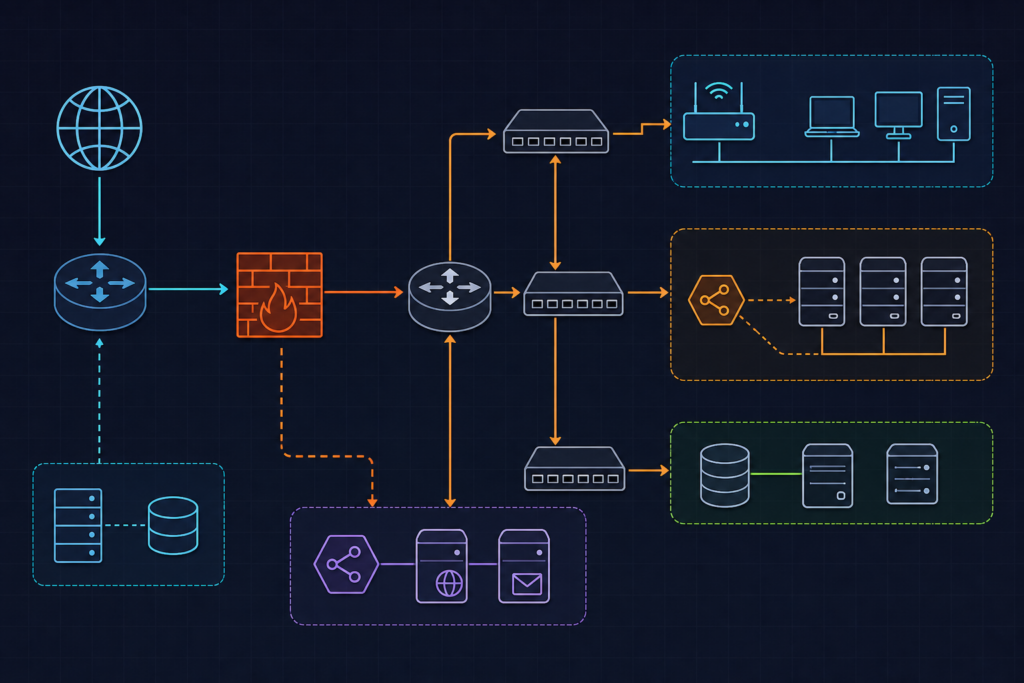
The Problem
Cloudflare WAF custom rules for WordPress origin server protection solve a specific and underappreciated vulnerability: the gap between your Cloudflare zone and your actual server. Most WordPress hardening guides focus on what Cloudflare blocks at the edge, but they ignore the fact that your origin IP is often discoverable — through DNS history, certificate transparency logs, or simple subnet scanning. Once an attacker has your server’s real IP address, they can send requests directly to port 80 or 443, bypassing every Cloudflare rule you’ve configured.
The consequences are predictable. Bots hammer wp-login.php with credential-stuffing payloads. Scanners probe xmlrpc.php for authenticated RPC calls. Exploit frameworks fingerprint your WordPress version through response headers and error pages. None of this traffic ever touches your WAF because it never entered through Cloudflare’s edge.
There’s a second, subtler problem. Even traffic that does route through Cloudflare can be misconfigured into irrelevance. Teams set WAF rule actions to Log during testing and forget to promote them to Block. Rules appear active in the dashboard. Metrics show matches. But nothing is actually being enforced. The attack surface stays wide open while the team believes it’s protected.
This tutorial addresses both failure modes. We’ll build a layered defense that validates every inbound request actually arrived through Cloudflare, locks down sensitive WordPress endpoints, and filters known exploit tooling — all expressed as code using the Terraform Cloudflare provider.
Approach
The strategy has four distinct layers, each addressing a different attack vector. Executed in order, they create a defense-in-depth posture where bypassing one layer still leaves an attacker facing the next.
Layer 1 — Authenticated-origin pull validation. Every legitimate request through Cloudflare’s edge can carry a secret header injected by your zone configuration. Your origin server rejects any request missing that header with a 403. This closes the direct-IP bypass entirely, regardless of what port or protocol the attacker uses.
Layer 2 — Endpoint-specific access control. /xmlrpc.php gets blocked unconditionally for most WordPress installations. /wp-admin gets a managed challenge for any source IP outside your explicitly allowlisted ranges. These rules are narrow and high-confidence — they don’t require bot scoring or heuristics.
Layer 3 — User-Agent and pattern filtering. Known WordPress exploit scanners — WPScan, sqlmap, Nikto, Nuclei — advertise themselves in their User-Agent strings. A regex-based WAF rule catches these before they consume any application resources.
Layer 4 — Bot score gating. For traffic that passes the above filters, Cloudflare’s Bot Management score provides a probabilistic signal. Scores below 15 indicate near-certain automation. We log these initially, then promote to block once we’ve validated the rule doesn’t catch legitimate crawlers.
Cloudflare’s Wirefilter expression language governs all of this. Rule priority runs lowest number first — priority 1 fires before priority 100 — so allow-list rules must sit at lower priority numbers than block rules. We’ll encode the entire ruleset as a cloudflare_ruleset Terraform resource, making it auditable, version-controlled, and deployable across multiple zones.
For related infrastructure patterns on this site, the post on IAM roles and least-privilege policies for CI/CD pipelines covers a similar layered approach applied to AWS access control.
Blocking Direct-IP and Non-Cloudflare Requests
The foundation of this entire setup is the authenticated-origin pull mechanism. Cloudflare injects a custom header — in our case x-origin-secret — into every request forwarded to your origin. Your origin server validates that header before processing anything else. Any request arriving without the correct value, whether it came from a direct-IP attacker or a misconfigured proxy, gets dropped at the server level.
On the Nginx side, add this validation inside your server block. The check happens before WordPress’s PHP-FPM process ever receives the request:
# /etc/nginx/sites-available/wordpress
server {
    listen 443 ssl;
    server_name example.com;

    # Reject any request missing the Cloudflare-injected origin secret
    if ($http_x_origin_secret != "YOUR_SECRET") {
        return 403;
    }

    location / {
        try_files $uri $uri/ /index.php?$args;
    }

    location ~ \.php$ {
        fastcgi_pass unix:/run/php/php8.3-fpm.sock;
        include fastcgi_params;
        fastcgi_param SCRIPT_FILENAME $document_root$fastcgi_script_name;
    }
}
On the Cloudflare side, enable Authenticated Origin Pulls under SSL/TLS → Origin Server → Authenticated Origin Pulls. Toggle it on and upload your origin certificate. Cloudflare will then attach the mutual TLS certificate to every request it forwards to your origin.
The corresponding WAF rule — Rule 2 in our Terraform configuration — enforces this at the Cloudflare layer as well, blocking requests that don’t carry the secret before they even reach your server. The Cloudflare health check IP ranges get an unconditional skip rule at higher priority (Rule 1) so uptime monitoring continues to function correctly.
One important note on the Terraform expression syntax: the x-origin-secret header reference uses bracket notation — http.request.headers["x-origin-secret"][0] — because Wirefilter treats header names as map keys. The [0] index selects the first value when a header appears multiple times.
Locking Down wp-admin and xmlrpc.php
These two endpoints represent the highest-value targets on any WordPress installation. xmlrpc.php exposes an authenticated RPC interface that attackers use for brute-force login attempts, content injection, and DDoS amplification via the system.multicall method. Unless you’re running Jetpack with remote publishing enabled, there is no reason to leave it accessible.
/wp-admin requires more nuance. The admin-ajax handler at /wp-admin/admin-ajax.php serves front-end AJAX requests from logged-out users — WooCommerce cart operations, search suggestions, and similar functionality. Blocking it unconditionally breaks legitimate site behavior. The rule needs to challenge the admin directory broadly while explicitly exempting that one path.
Here is the relevant section of the Terraform ruleset, covering Rules 3 and 4:
  # Rule 3: Block all requests to xmlrpc.php
  rules {
    ref         = "block_xmlrpc"
    description = "Disable XML-RPC endpoint entirely"
    expression  = "http.request.uri.path eq \"/xmlrpc.php\""
    action      = "block"
    enabled     = true
  }

  # Rule 4: Challenge wp-admin access from outside allowlisted CIDRs
  rules {
    ref         = "challenge_wpadmin"
    description = "Managed challenge for wp-admin outside trusted IPs"
    expression  = <<-EOT
      http.request.uri.path contains "/wp-admin"
      and not ip.src in {${join(" ", var.admin_allowed_cidrs)}}
      and not http.request.uri.path eq "/wp-admin/admin-ajax.php"
    EOT
    action      = "managed_challenge"
    enabled     = true
  }
The managed_challenge action is preferable to a hard block for /wp-admin because it handles the case where you’re accessing the admin from a new IP — a coffee shop, a client’s office, a mobile network. Cloudflare’s managed challenge issues a non-interactive JavaScript proof-of-work that legitimate browsers pass transparently, while bots and scanners fail it.
Pass your admin IP allowlist as a Terraform variable. Keep it in a terraform.tfvars file that is not committed to version control, or pull it from a secrets manager. A typical entry looks like:
# terraform.tfvars
admin_allowed_cidrs = [
  "203.0.113.10/32",   # Office static IP
  "198.51.100.0/28"    # VPN egress range
]
You can also restrict by ASN for corporate environments where IP ranges are large but the autonomous system number is stable. The Wirefilter field is ip.geoip.asnum, and you combine it with the path check using and.
Filtering Malicious User-Agents and Request Patterns
Automated WordPress exploit tools almost universally identify themselves in their User-Agent headers. This is partly because many are open-source projects that include their name by default, and partly because operators running large-scale scans don’t bother to rotate strings when the target population is millions of sites. We can exploit this predictability with a single regex rule.
The pattern in Rule 5 covers the most common offenders: WPScan (the dedicated WordPress vulnerability scanner), sqlmap, Nikto, zgrab (the Go-based banner grabber used in academic and malicious scanning alike), Masscan, Nuclei (the template-based vulnerability scanner), and the default Go HTTP client string that many custom exploit tools emit when developers don’t set a custom agent.
  # Rule 5: Block known malicious WordPress scanner User-Agents
  rules {
    ref         = "block_scanner_ua"
    description = "Drop requests from common WP exploit scanners"
    expression  = <<-EOT
      http.user_agent matches
      "(?i)(wpscan|sqlmap|nikto|zgrab|masscan|nuclei|go-http-client/1\\.1)"
    EOT
    action      = "block"
    enabled     = true
  }
The (?i) flag makes the match case-insensitive. The double-escaped backslash in go-http-client/1\\.1 is necessary because Wirefilter’s regex engine treats the dot as a literal character when escaped, preventing it from matching go-http-client/1X1 or similar variants.
Beyond User-Agent filtering, you can extend this rule to catch path-based exploit patterns. Requests probing /wp-content/plugins/ with directory traversal sequences, attempts to access /wp-config.php directly, or requests with suspiciously long query strings are all signals worth capturing. The Wirefilter expression for path-based patterns uses http.request.uri.path matches with a regex, and you can combine multiple conditions with or:
# Supplemental expression — add to block_scanner_ua or create a separate rule
(http.request.uri.path matches "(?i)(\\.git/config|wp-config\\.php|\\.env)")
or
(http.request.uri.query matches "(?i)(union.*select|exec\\(|eval\\()")
Keep this rule focused. The broader you make the regex, the higher the risk of false positives. Start narrow, check Security Analytics for a week, then expand the pattern if you see gaps.
Enforcing Authenticated-Origin Pull and Bot Score Gating
With the structural rules in place, Rule 6 adds a probabilistic layer using Cloudflare’s bot management scoring. The cf.bot_management.score field ranges from 1 to 99, where scores below 30 indicate likely automated traffic and scores below 15 indicate near-certain bots. This field requires the Bot Management add-on — it is not available on the free or Pro plans without it.
We configure this rule as log initially rather than block. This is intentional and important. Low bot scores can occasionally catch legitimate monitoring services, RSS aggregators, or API clients that don’t set standard browser User-Agents. Running in log mode for 48 to 72 hours lets you review the Security Analytics data and confirm the rule isn’t catching anything you want to allow.
  # Rule 6: Log (then promote to block) low bot-score non-API traffic
  rules {
    ref         = "log_low_bot_score"
    description = "Log suspicious bot traffic scoring below 15 for review"
    expression  = "cf.bot_management.score lt 15 and not http.request.uri.path starts_with \"/wp-json/\""
    action      = "log"
    enabled     = true
  }
The exclusion for /wp-json/ is deliberate. The WordPress REST API is consumed by headless frontends, mobile apps, and third-party integrations that may present low bot scores because they use non-browser HTTP clients. Excluding this path from the bot score rule prevents those integrations from being blocked when you promote the rule to block.
Once you’ve reviewed the logs and confirmed the rule is behaving correctly, update the Terraform resource to change action = "log" to action = "block" and apply the change. The Cloudflare Ruleset Engine fields reference documents every available field including the full bot management field set.
Here is the complete Terraform configuration bringing all six rules together:
# cloudflare_waf_custom_rules.tf
# Terraform: Cloudflare WAF custom ruleset for WordPress origin protection
# Provider: cloudflare/cloudflare >= 4.x

resource "cloudflare_ruleset" "wordpress_waf" {
  zone_id     = var.zone_id
  name        = "WordPress Origin Protection"
  description = "Custom WAF rules hardening WordPress on kuryzhev.cloud"
  kind        = "zone"
  phase       = "http_request_firewall_custom"

  # Rule 1: Allow Cloudflare health checks and verified uptime bots
  rules {
    ref         = "allow_cf_healthcheck"
    description = "Allow Cloudflare health check IPs unconditionally"
    expression  = "ip.src in {103.21.244.0/22 103.22.200.0/22 103.31.4.0/22}"
    action      = "skip"
    action_parameters {
      ruleset = "current"
    }
    enabled  = true
    position { before = "block_no_secret_header" }
  }

  # Rule 2: Block requests missing the authenticated origin secret header
  rules {
    ref         = "block_no_secret_header"
    description = "Reject requests that did not pass through Cloudflare edge"
    expression  = "not http.request.headers[\"x-origin-secret\"][0] eq \"${var.origin_secret}\""
    action      = "block"
    enabled     = true
  }

  # Rule 3: Block all requests to xmlrpc.php
  rules {
    ref         = "block_xmlrpc"
    description = "Disable XML-RPC endpoint entirely"
    expression  = "http.request.uri.path eq \"/xmlrpc.php\""
    action      = "block"
    enabled     = true
  }

  # Rule 4: Challenge wp-admin access from outside allowlisted CIDRs
  rules {
    ref         = "challenge_wpadmin"
    description = "Managed challenge for wp-admin outside trusted IPs"
    expression  = <<-EOT
      http.request.uri.path contains "/wp-admin"
      and not ip.src in {${join(" ", var.admin_allowed_cidrs)}}
      and not http.request.uri.path eq "/wp-admin/admin-ajax.php"
    EOT
    action      = "managed_challenge"
    enabled     = true
  }

  # Rule 5: Block known malicious WordPress scanner User-Agents
  rules {
    ref         = "block_scanner_ua"
    description = "Drop requests from common WP exploit scanners"
    expression  = <<-EOT
      http.user_agent matches
      "(?i)(wpscan|sqlmap|nikto|zgrab|masscan|nuclei|go-http-client/1\\.1)"
    EOT
    action      = "block"
    enabled     = true
  }

  # Rule 6: Log (then promote to block) low bot-score non-API traffic
  rules {
    ref         = "log_low_bot_score"
    description = "Log suspicious bot traffic scoring below 15 for review"
    expression  = "cf.bot_management.score lt 15 and not http.request.uri.path starts_with \"/wp-json/\""
    action      = "log"
    enabled     = true
  }
}

variable "zone_id"             {}
variable "origin_secret"       { sensitive = true }
variable "admin_allowed_cidrs" { type = list(string) }
Verify It Works
Verification has three components: confirming rules fire on malicious traffic, confirming they don’t fire on legitimate traffic, and confirming the origin secret header validation works end-to-end.
Test the origin secret validation with curl from a machine that is not in your Cloudflare zone’s allowed IP list. Send a request directly to your origin IP without the secret header — you should receive a 403 from Nginx before WordPress loads:
# Should return 403 — no secret header, direct-IP request
curl -v -H "Host: example.com" http://YOUR_ORIGIN_IP/

# Should return 200 — correct secret header present
curl -v -H "Host: example.com" \
     -H "x-origin-secret: YOUR_SECRET" \
     http://YOUR_ORIGIN_IP/
Test the xmlrpc.php block through Cloudflare’s proxy (using your domain, not the origin IP) to confirm the WAF rule fires before the request reaches your server:
# Should return 403 with Cloudflare error page — WAF block
curl -v https://example.com/xmlrpc.php

# Confirm the blocking rule name in response headers
curl -sI https://example.com/xmlrpc.php | grep -i "cf-"
Test the User-Agent rule by sending a request with a scanner string. Cloudflare should return a 403 and the Security Analytics dashboard should log a WAF event against rule block_scanner_ua:
# Should be blocked by the scanner UA rule
curl -v -A "WPScan v3.8.22" https://example.com/
Review Security Analytics in the Cloudflare dashboard under Security → Overview. Filter by the last 24 hours and look for events grouped by rule ID. Each of your custom rules should appear with a match count. If a rule shows zero matches after a day of normal traffic, verify the expression syntax — a common issue is quoting errors in Wirefilter expressions when applied through the API versus the dashboard editor.
For programmatic auditing, configure a Logpush job to export the http_requests dataset to S3 or R2. Filter on the WAFAction field to isolate rule hits, and cross-reference with WAFRuleID to confirm each rule is firing as expected. The Cloudflare Logpush http_requests field reference lists every available field including WAFMatchedVar, which shows the specific value that triggered the match — useful for debugging regex rules.
One final check: access /wp-admin from an IP outside your allowlist. You should see Cloudflare’s managed challenge page, not a WordPress login form. Then access it from an allowlisted IP — you should reach the login form directly without a challenge.
Related Ideas
The rules in this tutorial address the most common attack vectors, but several adjacent hardening measures are worth considering once this baseline is stable.
Cloudflare Turnstile on the login form. The WAF rule challenges /wp-admin from unknown IPs, but the login form at /wp-login.php is a separate endpoint. Embedding a Turnstile widget in the WordPress login template adds a client-side proof-of-work that stops credential-stuffing bots before they submit a single attempt. This complements the WAF rules rather than replacing them.
Rate limiting on wp-login.php. WAF custom rules are not the right tool for per-IP request counting — that belongs in a dedicated Cloudflare Rate Limiting rule. Configure a rule that allows a maximum of 5 login attempts per IP per minute, with a 10-minute block on breach. The rate limiting rule operates independently of the WAF ruleset and uses its own counting window.
Page Shield for CSP enforcement. Once your origin is locked down at the network layer, the next attack surface is client-side script injection. Cloudflare Page Shield monitors JavaScript resources loaded by your pages and can alert on new or modified scripts — a useful signal for detecting supply-chain compromises in WordPress plugins.
Zero Trust Access for wp-admin. For teams where the admin allowlist approach becomes difficult to maintain — remote workers, contractors, rotating IPs — Cloudflare Zero Trust Access provides an identity-aware proxy in front of the admin path. Users authenticate through your identity provider before the request ever reaches WordPress. This is a more operationally complex setup but eliminates the IP allowlist maintenance burden entirely.
For teams managing multiple WordPress sites or combining this WAF configuration with broader infrastructure automation, the patterns in the Helm chart environment overrides post on this site demonstrate how to structure Terraform variables for environment-specific configurations — the same approach applies to managing separate WAF rulesets for staging and production zones.