Why this checklist

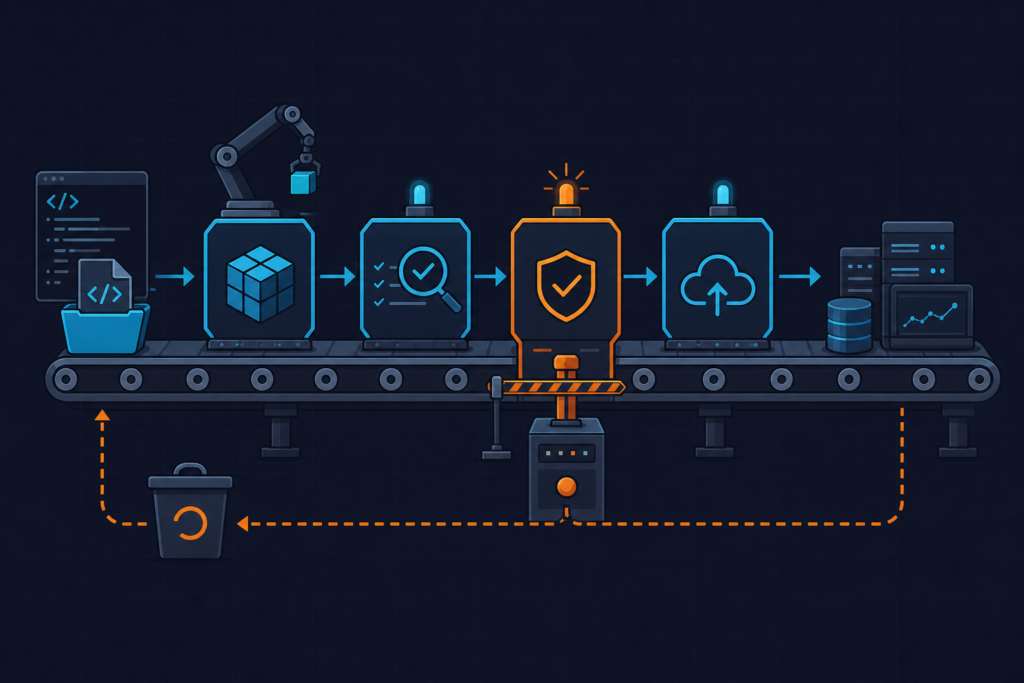
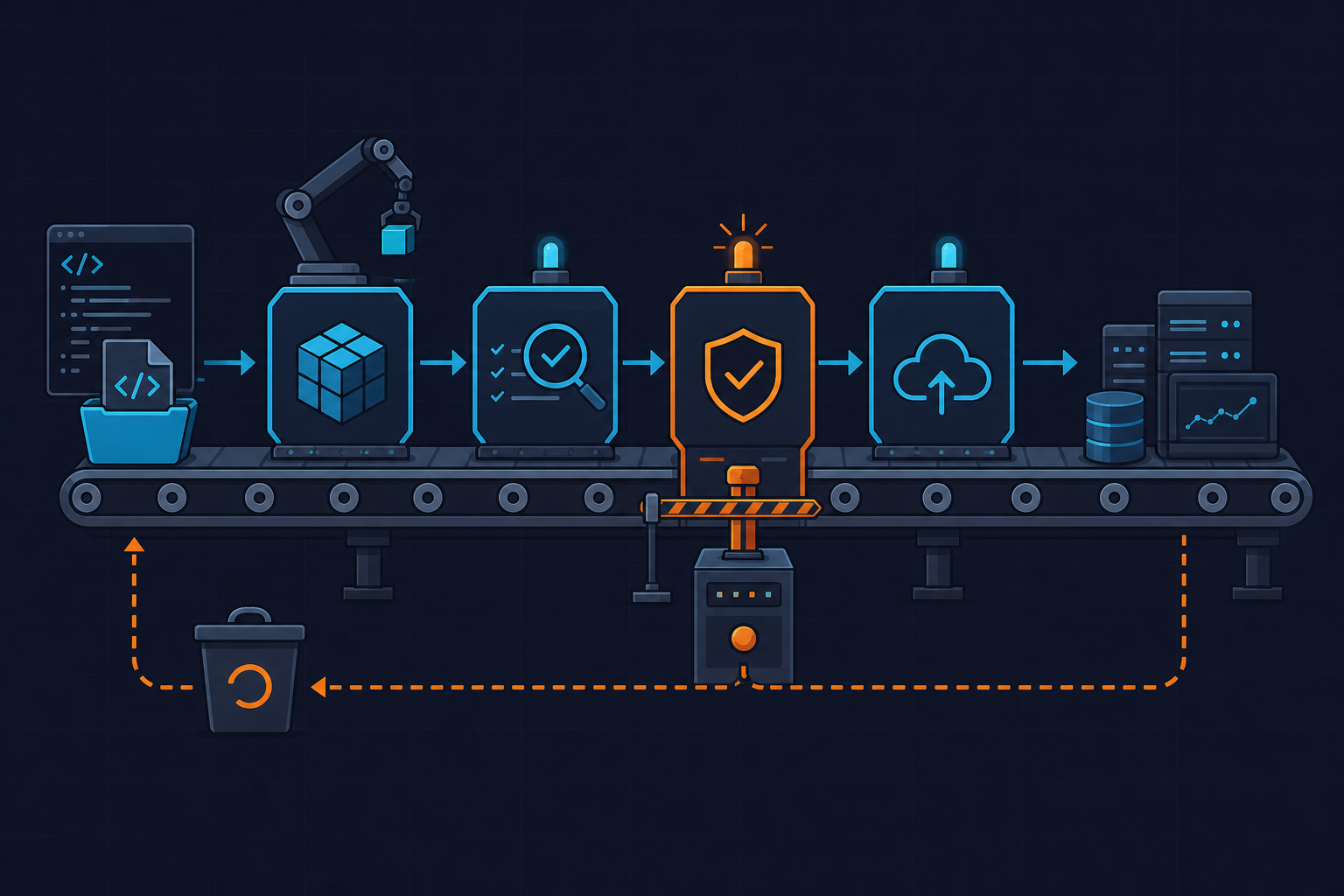
Last month a teammate pushed a hotfix that dropped test coverage from 82% to 68%. SonarQube flagged it. The pipeline turned green anyway, deployed to prod, and nobody noticed until customer support started forwarding 500 errors two hours later. That’s the failure mode this CI/CD quality gate checklist exists to prevent: a pipeline that reports quality problems but doesn’t actually enforce them.
Most teams I’ve worked with have some version of three control points — a quality gate, a manual approval step, and a rollback plan. The problem is these are almost always implemented in isolation, by different people, at different times, so nobody checks whether they actually connect. You end up with a SonarQube integration that scans but never blocks, an approval step that gates the wrong action, or a rollback command that’s never been run outside someone’s laptop. Each piece looks fine on its own. Together they leave a gap wide enough to drive a broken release through.
This checklist is for teams running GitHub Actions, GitLab CI, or Jenkins to deploy into Kubernetes or VM-based production environments — basically anyone who has a “deploy to prod” job and more than one person touching it. If you’re the only one who ever deploys, you probably don’t need half of this. If you have a team, an on-call rotation, or compliance requirements, you need all fifteen items below wired together, not just present.
We cover related patterns — GitOps rollback flows, drift detection, and alerting on failed deploys — in more detail on the DevOps_DayS blog if you want the deeper dives after this.
The checklist
Quality gate (items 1–5)
- Coverage threshold is enforced in CI, not just reported. A SonarQube dashboard showing “68.4% coverage” in red means nothing if the pipeline exit code is still 0. The scanner has to fail the job.
- Static analysis blocks the merge, not just the deploy. Catching bad code at PR time is cheaper than catching it after a deploy job runs.
- Dependency and vulnerability scanning is a gate, not a report. A critical CVE in a transitive dependency should stop the pipeline the same way a failing unit test does.
- The gate result is polled synchronously. This is the mistake that bit us: SonarQube runs asynchronously by default. Without
sonar.qualitygate.wait=true, the scanner step exits before the gate computation finishes, and the pipeline moves on regardless of the result. - Gate configuration lives in version control alongside the pipeline. If the coverage threshold is a checkbox in a web UI that only the team lead can see, it will drift silently. Keep it in the repo.
Here’s what a properly wired quality gate looks like in GitHub Actions, running against SonarQube 10.4 with the gate result actually blocking the downstream deploy job:
# .github/workflows/deploy-with-gate-approval-rollback.yml
name: deploy-prod

on:
  push:
    branches: [main]

jobs:
  quality-gate:
    runs-on: ubuntu-22.04
    steps:
      - uses: actions/checkout@v4
        with:
          fetch-depth: 0  # required for accurate SonarQube blame/coverage diff

      - name: Run tests with coverage
        run: |
          pytest --cov=app --cov-report=xml

      - name: SonarQube scan and wait for gate
        uses: SonarSource/sonarqube-scan-action@v2
        with:
          args: >
            -Dsonar.qualitygate.wait=true
            -Dsonar.qualitygate.timeout=300
        env:
          SONAR_TOKEN: ${{ secrets.SONAR_TOKEN }}
        # This step FAILS the job if the gate fails, blocking downstream deploy

  deploy-prod:
    needs: quality-gate
    runs-on: ubuntu-22.04
    environment:
      name: production  # required reviewers configured in repo settings
    timeout-minutes: 30  # prevents indefinitely stuck approval from blocking runner queue
    steps:
      - uses: actions/checkout@v4

      - name: Deploy immutable image
        run: |
          IMAGE_DIGEST=$(cat digest.txt)  # never deploy by :latest tag
          kubectl set image deployment/myapp \
            myapp=registry.example.com/myapp@${IMAGE_DIGEST} \
            --record

      - name: Post-deploy smoke test
        id: smoke
        run: ./scripts/smoke-test.sh
        continue-on-error: true

      - name: Auto-rollback on smoke test failure
        if: steps.smoke.outcome == 'failure'
        run: |
          echo "Smoke test failed, rolling back..."
          kubectl rollout undo deployment/myapp
          kubectl rollout status deployment/myapp --timeout=120s
          exit 1  # still fail the pipeline so it's visible, but prod is safe
If the gate fails, the error looks exactly like a test failure: ERROR: Quality gate failed: Coverage 68.4% is less than required 80.0%. You can also check it manually against the SonarQube API with GET /api/qualitygates/project_status?projectKey=myapp before trusting the CI output.
Manual approval (items 6–10)
- Protected environment with required reviewers. In GitHub Actions environments, this is Settings → Environments →
production→ Required reviewers. Note the cap: max 6 reviewers per environment. - Approval is scoped to the specific environment. An approval on staging should never carry over to prod. GitLab CI does this with
environment:plusdeployment_tier; Jenkins uses aninputstep scoped inside the relevantstage. - Pending approvals expire. GitHub Actions environment approvals have no built-in expiry. Pair them with
timeout-minuteson the job so a stale pending deploy auto-cancels after, say, 60 minutes instead of sitting in the queue for three days. - Audit log of who approved and when. CI logs aren’t enough — GitHub Actions defaults to 90 days of log retention, which is often shorter than what compliance asks for. Ship approver identity, timestamp, and commit SHA to an external system.
- Approval gates the mutating step, not the step after it. This is the one I’ve seen go wrong the most: teams put the approval gate after the deploy job has already applied database migrations. By the time someone clicks “approve,” the mutation already happened. The gate has to sit in front of anything that changes state.
Rollback (items 11–15)
- Every deploy tags an immutable artifact. Deploy by digest —
myapp@sha256:...— never by:latest. If you roll back while the tag still points at the new build, you’ll re-pull the broken image. - Rollback command tested in staging quarterly. A rollback path nobody has run since it was written is a rollback path that fails during the actual incident.
- Rollback triggers an automated smoke test. Don’t assume the revert worked — verify it the same way you’d verify a fresh deploy.
- Previous N revisions are retained. Kubernetes Deployments default to
revisionHistoryLimit: 10. You can lower it for cost, but I wouldn’t go below 3 — that’s the minimum for a rollback to actually have somewhere to go. - Rollback is runnable without pipeline access. Keep a break-glass script that works even if CI is down.
To pick the right target revision, check history first, then roll back with kubectl rollout undo:
# Example: kubectl rollout history output used to pick a rollback target

$ kubectl rollout history deployment/myapp
deployment.apps/myapp
REVISION  CHANGE-CAUSE
4         kubectl set image deployment/myapp myapp=myapp@sha256:1a2b3c...
5         kubectl set image deployment/myapp myapp=myapp@sha256:4d5e6f...
6         kubectl set image deployment/myapp myapp=myapp@sha256:7g8h9i... (current, broken)

$ kubectl rollout undo deployment/myapp --to-revision=5
deployment.apps/myapp rolled back

$ kubectl rollout status deployment/myapp
Waiting for deployment "myapp" rollout to finish: 1 old replicas pending termination...
deployment "myapp" successfully rolled out
If you’re on Helm, the equivalent is helm rollback myapp 0 --timeout 5m (revision 0 means “previous release”). If you’re running canary or blue-green through Argo Rollouts 1.6, use kubectl argo rollouts undo myapp-rollout — it triggers the same automated analysis checks that gated the original rollout.
Commonly missed items
The gaps that only show up during an incident, not during a code review:
The gate runs but nobody waits for it. This is the SonarQube case from the intro — the scan happens against an external tool, but the CI job doesn’t block on the result. It’s the single most common thing I find when auditing someone else’s pipeline. Always check for sonar.qualitygate.wait=true explicitly; don’t assume it’s there.
Approval granted to a bot or a single human. I’ve seen service accounts configured as the “required reviewer” for a production environment — which means the pipeline can approve itself. Separate the approver identity from the pipeline execution identity, full stop, or you’ve built a self-approval bypass with extra YAML. And if the only human approver is on vacation, deploys just stop. Always have a backup reviewer.
Rollback assumes rebuilding from source. If your “rollback” is actually a rebuild of an old commit, check whether the build environment has drifted since then — a base image update, a removed package mirror, a changed lockfile resolution. We got burned by this once: the rollback commit built fine three weeks earlier but failed against a newer Alpine base image during the actual incident. That’s exactly why immutable digests matter — you’re not rebuilding, you’re re-deploying something that already ran successfully.
Silent rollbacks. If a rollback fires and nothing alerts, nobody investigates the root cause, and the same bad deploy goes out again next sprint. Wire rollback execution into your alerting pipeline the same way you’d alert on a failed deploy.
Automation ideas
None of this has to be manual toil once the controls exist. A few things worth automating without weakening any of the gates above:
Auto-generate approval requests with context. A Slack message with a diff summary, a link to the SonarQube gate report, and an approve/deny button turns a five-minute Slack hunt into a ten-second decision. Reviewers approve faster when they don’t have to go dig for context.
Trigger rollback from health checks, not humans. The workflow above already does this — a failed smoke test triggers kubectl rollout undo automatically. Extend it with HTTP error rate or latency SLO breaches from your monitoring stack instead of waiting for someone to notice a spike on a dashboard.
Watch out for rollback loops. If the previous version shares the same underlying issue — a bad database migration, for example — an error-rate-triggered auto-rollback can flap between two broken versions indefinitely. Always pair automated rollback with a circuit breaker or a max-attempts counter so it fails loud instead of looping quiet.
Run scheduled rollback drills. A weekly job that rolls a staging namespace back to its previous revision and runs the smoke test suite catches rollback path rot before it’s the middle of an incident. It’s the same idea as a chaos engineering game day, just scoped to one specific failure mode.
On cost: re-running a full coverage suite on every quality gate check burns CI minutes fast on large repos. Switch to PR-scoped analysis with sonar.pullrequest.key — it typically cuts scan runtime by 40-60% since it only analyzes the diff instead of the whole codebase.
Put together, a working CI/CD quality gate checklist isn’t about adding more steps — it’s about making sure the steps you already have actually connect to each other. Gate, approval, rollback: each one is only as good as its handoff to the next.