AWS DataSync EventBridge not triggering is one of those failures that looks deceptively simple — your task shows SUCCESS, aws s3 ls confirms the files landed in the bucket, and yet your downstream Lambda never runs. No errors. No retries. Just silence. I’ve seen this burn teams for an entire day before anyone questioned the event source itself.
This is a runbook. Work through it top to bottom. Each section maps to a specific failure mode, and by the end you’ll have a working pipeline plus a pre-flight script to prevent this from happening again.
Symptoms

Before touching any configuration, confirm you’re looking at the right failure. These are the three patterns that indicate a DataSync-to-EventBridge wiring problem specifically — not a Lambda bug, not an IAM issue downstream.
Symptom 1: EventBridge rule shows zero invocations in CloudWatch metrics. Navigate to EventBridge → Rules → your rule → Monitoring tab. The Invocations metric is flatline even though the DataSync task completed successfully.
Symptom 2: S3 bucket has the files. Run aws s3 ls s3://your-bucket/prefix/ --recursive and the objects are there. The transfer worked. The event pipeline didn’t.
Symptom 3: DataSync task status is SUCCESS in both the console and via CLI. Running aws datasync describe-task-execution --task-execution-arn <arn> returns Status: SUCCESS. But no ObjectCreated events appear in EventBridge event bus logs, and no S3 data events show up in CloudTrail unless you explicitly enabled data event logging.
Watch out for this gotcha: "TaskExecutionArn": null in the EventBridge event detail means the task was cancelled before execution started — that’s a different problem entirely, not a networking or notification failure. Don’t spend time debugging event routing if you’re seeing null execution ARNs.
Root Cause
There are actually two separate architectural reasons this breaks, and in most production incidents I’ve seen, both are present simultaneously.
Reason 1 — Wrong event source in the rule. DataSync task execution events are published under the source aws.datasync with detail-type DataSync Task Execution State Change. If your EventBridge rule is listening to aws.s3 for Object Created events, it will never match a DataSync completion event. These are two completely separate event streams on the same default event bus.
Reason 2 — S3 EventBridge integration is disabled at the bucket level. Even if you correctly target aws.s3 events, S3 does not forward events to EventBridge by default. There is a separate toggle — EventBridgeConfiguration — that must be explicitly enabled via aws s3api put-bucket-notification-configuration. This is entirely distinct from the legacy SNS/SQS notification config. Buckets created before November 2021 (when this feature went GA) will never have it enabled, even if the bucket itself is years old.
Reason 3 — Wrong S3 event type for large files. DataSync uses an internal multipart copy mechanism. For files above the 8 MB threshold, DataSync calls s3:CompleteMultipartUpload, not s3:PutObject. If your EventBridge rule filter only includes s3:ObjectCreated:Put, large file transfers pass silently. You need both s3:ObjectCreated:Put and s3:ObjectCreated:CompleteMultipartUpload in the filter.
Also worth checking: CloudTrail must have S3 data events enabled (s3:PutObject, s3:CompleteMultipartUpload) to verify whether DataSync actually wrote objects. Management events alone won’t show you individual file writes. Without this visibility, you’re debugging blind.
Fix #1: Switch the EventBridge Rule Source to aws.datasync
This is the fastest fix and the correct long-term architecture. Instead of relying on S3 object notifications — which have their own toggle requirements and multipart edge cases — trigger directly off the DataSync task execution event. This is deterministic: one task completion equals one event, regardless of file count or size.
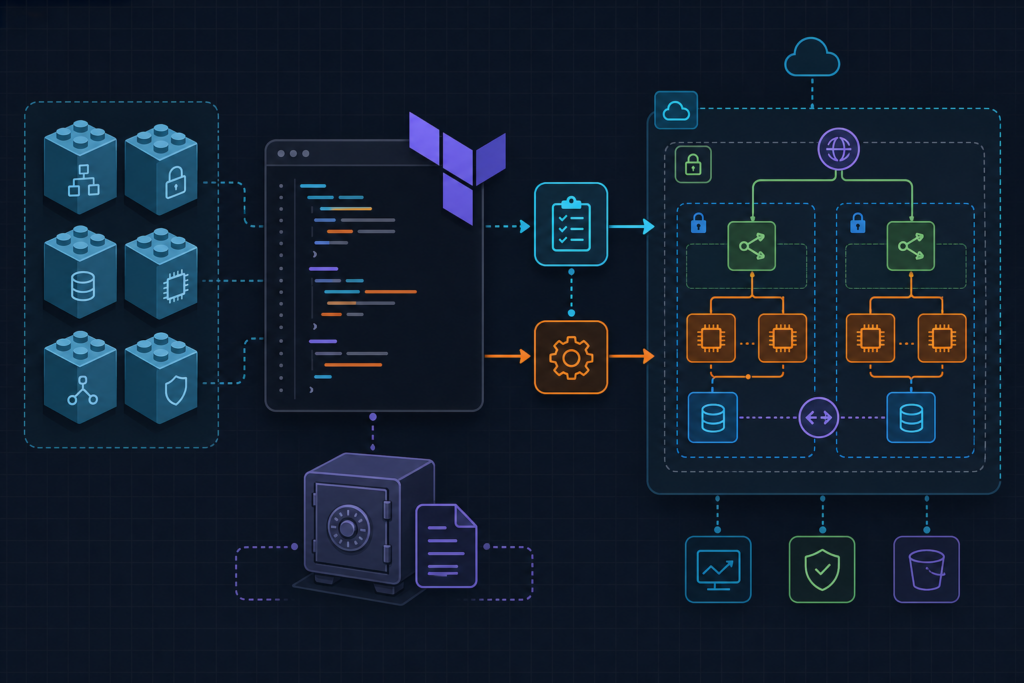
The CloudFormation below defines the correct event pattern, scopes it to a specific task ARN, and uses an InputTransformer to pass the execution ARN and destination location to your Lambda without hardcoding bucket names.
First, test the event pattern before deploying. Capture a real event from CloudTrail or EventBridge archive replay and run:
aws events test-event-pattern \
  --event-pattern file://pattern.json \
  --event file://sample-event.json
Then deploy the full rule with the CloudFormation template. The key sections are the event pattern (source must be aws.datasync, not aws.s3), the InputTransformer that extracts destination ARN from the event payload, and the Lambda resource-based policy — which is the second most common silent failure in this entire pattern:
# eventbridge-datasync-rule.yaml
# CloudFormation template: EventBridge rule triggered by DataSync task SUCCESS
# Targets a Lambda function for downstream S3 processing
# Tested with aws-cli 2.15.x, CloudFormation schema 2010-09-09

AWSTemplateFormatVersion: "2010-09-09"
Description: "DataSync → EventBridge → Lambda automation pattern"

Parameters:
  DataSyncTaskArn:
    Type: String
    Description: "ARN of the DataSync task to monitor"
  LambdaFunctionArn:
    Type: String
    Description: "ARN of the downstream processing Lambda"
  DestinationBucketName:
    Type: String
    Description: "S3 bucket receiving DataSync output"

Resources:

  # Step 1: Enable S3 → EventBridge integration on destination bucket
  # This is separate from legacy SNS/SQS notification config
  BucketNotificationConfig:
    Type: AWS::S3::BucketNotification
    Properties:
      Bucket: !Ref DestinationBucketName
      NotificationConfiguration:
        EventBridgeConfiguration: {}  # Empty block enables the integration; do NOT omit

  # Step 2: EventBridge rule matching DataSync task execution SUCCESS
  # Source is aws.datasync -- NOT aws.s3
  DataSyncSuccessRule:
    Type: AWS::Events::Rule
    Properties:
      Name: "datasync-task-success-trigger"
      Description: "Fires when DataSync task execution reaches SUCCESS state"
      EventBusName: "default"
      State: ENABLED
      EventPattern:
        source:
          - "aws.datasync"
        detail-type:
          - "DataSync Task Execution State Change"
        detail:
          State:
            - "SUCCESS"
          TaskArn:
            - !Ref DataSyncTaskArn  # Scope rule to specific task; remove for all tasks
      Targets:
        - Id: "DataSyncLambdaTarget"
          Arn: !Ref LambdaFunctionArn
          # Pass task execution ARN and destination location to Lambda
          InputTransformer:
            InputPathsMap:
              taskArn: "$.detail.TaskArn"
              executionArn: "$.detail.TaskExecutionArn"
              destinationArn: "$.detail.DestinationLocationArn"
              bytesTransferred: "$.detail.BytesTransferred"
            InputTemplate: |
              {
                "taskArn": "<taskArn>",
                "executionArn": "<executionArn>",
                "destinationArn": "<destinationArn>",
                "bytesTransferred": "<bytesTransferred>",
                "triggeredBy": "datasync-eventbridge-automation"
              }

  # Step 3: Lambda resource-based policy -- required or EventBridge silently fails
  LambdaInvokePermission:
    Type: AWS::Lambda::Permission
    Properties:
      FunctionName: !Ref LambdaFunctionArn
      Action: "lambda:InvokeFunction"
      Principal: "events.amazonaws.com"
      SourceArn: !GetAtt DataSyncSuccessRule.Arn
      # SourceAccount prevents confused deputy -- always include
      SourceAccount: !Ref AWS::AccountId

  # Step 4: CloudWatch Alarm fallback trigger
  # Fires if DataSync logs "Execution completed" -- independent of EventBridge S3 path
  DataSyncLogMetricFilter:
    Type: AWS::Logs::MetricFilter
    Properties:
      LogGroupName: "/aws/datasync"
      FilterPattern: '"Execution completed"'
      MetricTransformations:
        - MetricName: "DataSyncTaskSuccess"
          MetricNamespace: "Custom/DataSync"
          MetricValue: "1"
          DefaultValue: 0

  DataSyncFallbackAlarm:
    Type: AWS::CloudWatch::Alarm
    Properties:
      AlarmName: "datasync-task-success-fallback"
      MetricName: "DataSyncTaskSuccess"
      Namespace: "Custom/DataSync"
      Statistic: Sum
      Period: 60
      EvaluationPeriods: 1
      Threshold: 1
      ComparisonOperator: GreaterThanOrEqualToThreshold
      TreatMissingData: notBreaching
      # Wire alarm to SNS or directly to EventBridge via alarm action
      AlarmActions: []  # Add SNS ARN here for fallback notification
Watch out for this: Never delete and recreate an EventBridge rule to pause it. Use aws events put-rule --name your-rule --state DISABLED instead. Deleting resets the rule ARN, which breaks any existing Lambda resource-based policies that reference the old ARN — and EventBridge will silently fail to invoke your function with zero errors in rule metrics.
Fix #2: Enable S3 EventBridge Integration at the Bucket Level
If you want to keep an S3-event-based trigger as a secondary path (or if your architecture requires it), you must explicitly enable the EventBridge integration toggle on the bucket. This is not the same as configuring SNS or SQS notifications. It’s a separate API call, and it’s off by default on every bucket regardless of age.
Enable it with a single CLI command:
aws s3api put-bucket-notification-configuration \
  --bucket your-bucket-name \
  --notification-configuration '{"EventBridgeConfiguration": {}}'
Verify it took effect:
aws s3api get-bucket-notification-configuration --bucket your-bucket-nameThe response must contain "EventBridgeConfiguration": {}. An empty response body or a response that only shows legacy SNS/SQS config means S3 events are still being silently dropped before they reach EventBridge.
Once the toggle is on, update your EventBridge rule filter to include both event types. DataSync uses s3:ObjectCreated:Put for files under 8 MB and s3:ObjectCreated:CompleteMultipartUpload for anything larger. Missing either one means partial coverage. Your event pattern detail should look like this:
{
  "source": ["aws.s3"],
  "detail-type": ["Object Created"],
  "detail": {
    "bucket": {
      "name": ["your-bucket-name"]
    },
    "reason": [
      "PutObject",
      "CompleteMultipartUpload"
    ]
  }
}
One more IAM gotcha here: if your destination bucket has ACL enforcement enabled, the DataSync execution role must include s3:PutObjectAcl in addition to s3:PutObject. Missing this permission causes AccessDenied specifically on the multipart complete step — the initial upload succeeds, the final assembly fails, and you get no S3 event at all. Also, do not use aws:SourceArn pointing to the DataSync task ARN in your bucket policy conditions. DataSync writes using its service role ARN, not the task ARN. That condition will never match and all writes will be denied.
For more AWS automation patterns and event-driven pipeline designs, see the DevOps_DayS runbook library.
Fix #3: Add a CloudWatch Alarm as a Fallback Trigger
Fixes #1 and #2 cover the primary paths. This fix gives you a resilient secondary trigger that operates completely independently of EventBridge rule matching and S3 event toggles. I use this pattern in any pipeline where downstream processing latency matters and a missed event has real cost — for example, when DataSync feeds a compliance ingestion workflow with an SLA.
The mechanism: DataSync writes structured logs to /aws/datasync in CloudWatch Logs when you attach a log group at task creation time. The key flag is --cloud-watch-log-group-arn on aws datasync create-task. Omit it and there are no logs, which means no metric filter and no fallback. This is already included in the CloudFormation above, but worth calling out explicitly.
Once logging is enabled, the CloudFormation creates a Metric Filter that matches "Execution completed" in the log stream and publishes a custom metric DataSyncTaskSuccess in the Custom/DataSync namespace. A CloudWatch Alarm fires when that metric hits threshold ≥ 1 within a single 60-second evaluation period — giving you sub-60-second trigger latency independent of the S3 event pipeline.
Wire the alarm action to an SNS topic that targets your Lambda, or use it as a dead-letter fallback: if the primary EventBridge rule shows zero invocations after task completion (visible in the CloudWatch Invocations metric), the alarm path fires the same downstream workflow automatically.
One cost warning: DataSync charges $0.0125 per GB transferred. If a misconfigured EventBridge rule triggers retry loops that re-invoke DataSync tasks, you can multiply transfer costs 3–5x before anyone notices. The fallback alarm should invoke your Lambda to process data — never to re-trigger the DataSync task itself unless you have explicit idempotency controls in place. See the official DataSync monitoring documentation for log format details and execution state definitions.
Prevention
Run this pre-flight script before deploying any new DataSync pipeline. It checks all four conditions that cause silent failures in this pattern. Requires aws-cli 2.15+ and jq 1.6+.
#!/usr/bin/env bash
# pre-flight-checklist.sh
# Run before deploying any DataSync → EventBridge pipeline
# Requires: aws-cli 2.15+, jq 1.6+

set -euo pipefail

BUCKET_NAME="${1:?Usage: $0 <bucket-name> <task-arn> <rule-name>}"
TASK_ARN="${2:?}"
RULE_NAME="${3:?}"

echo "=== [1] Checking S3 EventBridge integration toggle ==="
NOTIF=$(aws s3api get-bucket-notification-configuration --bucket "$BUCKET_NAME" 2>/dev/null || echo "{}")
if echo "$NOTIF" | jq -e '.EventBridgeConfiguration' > /dev/null 2>&1; then
  echo "  PASS: EventBridgeConfiguration present"
else
  echo "  FAIL: EventBridgeConfiguration missing -- run:"
  echo "  aws s3api put-bucket-notification-configuration --bucket $BUCKET_NAME \\"
  echo "    --notification-configuration '{\"EventBridgeConfiguration\": {}}'"
  exit 1
fi

echo "=== [2] Validating EventBridge rule event pattern ==="
PATTERN=$(aws events describe-rule --name "$RULE_NAME" --query 'EventPattern' --output text)
if echo "$PATTERN" | jq -e '.source[] | select(. == "aws.datasync")' > /dev/null 2>&1; then
  echo "  PASS: Rule source is aws.datasync"
else
  echo "  WARN: Rule source may be aws.s3 -- DataSync task events use aws.datasync"
fi

echo "=== [3] Checking Lambda resource-based policy for EventBridge ==="
RULE_ARN=$(aws events describe-rule --name "$RULE_NAME" --query 'Arn' --output text)
# Verify Lambda policy allows events.amazonaws.com with this rule ARN as SourceArn
echo "  INFO: Manually verify Lambda policy includes SourceArn: $RULE_ARN"

echo "=== [4] Checking DataSync task CloudWatch logging ==="
CW_ARN=$(aws datasync describe-task --task-arn "$TASK_ARN" \
  --query 'CloudWatchLogGroupArn' --output text 2>/dev/null || echo "None")
if [[ "$CW_ARN" == "None" || -z "$CW_ARN" ]]; then
  echo "  FAIL: No CloudWatch log group attached -- metric filter fallback will not work"
else
  echo "  PASS: CloudWatch log group: $CW_ARN"
fi

echo "=== Pre-flight complete ==="
Beyond the script, three operational habits prevent this class of bug from recurring:
- Enable EventBridge archive retention. The default is 0 days — no archive. Set it to at least 7 days on the default event bus. This gives you replay-based debugging when a rule fires zero times and you need to verify whether the event was ever published.
- Tag all DataSync tasks with
envandpipelinetags. This enables cost allocation and lets you filter CloudWatch Logs Insights queries by pipeline without parsing ARNs out of log lines. - Always check
Result.ErrorCodeeven on SUCCESS. Runaws datasync describe-task-execution --task-execution-arn <arn>and inspectResult.ErrorCode. DataSync can reportStatus: SUCCESSwith partial file failures. IfFilesTransferredis less thanFilesVerified, you have a silent data gap downstream.
One final note on the EventBridge rule limit: the default event bus has a hard limit of 300 rules per account per region. Large organizations hitting this limit will have rules silently dropped with no error. If you’re in a high-rule-count environment, use a custom event bus for DataSync automation traffic and keep the default bus clean. The EventBridge service event documentation covers custom bus configuration and cross-account event routing in detail.
AWS DataSync EventBridge not triggering almost always comes down to one of the three root causes above — wrong event source, missing bucket toggle, or incomplete IAM policy on the Lambda target. Work through the fixes in order, run the pre-flight script on every new pipeline, and you’ll stop losing events silently.